Important: If You Use Gmail...
If you use Gmail, your inbox may have different tabs across the top called Primary, Social, and Promotions.
Here’s what that means:
- Gmail automatically sorts emails into these tabs.
- Virtually all emails from bloggers, other websites, and people you subscribe to are lumped into the “Promotions” tab automatically... where you may not see them.
- That means important updates and resources you’ve asked for might not appear in your main inbox.

The good news?
You can quickly move our emails into your Primary inbox so you don’t miss a thing.
You can follow the step-by-step guide below.
Step One:
Look at your Gmail account to see if the “tabbed” inboxes have been turned on (you’ll see the tabs across the top of your emails).
If so, here’s how to make sure you’re seeing the emails you’ve asked to see:

Step Two:
Click on the Promotions inbox tab. Drag any emails from anyone you want to hear from (like Your Year of Miracles) and drop them onto the Primary tab.
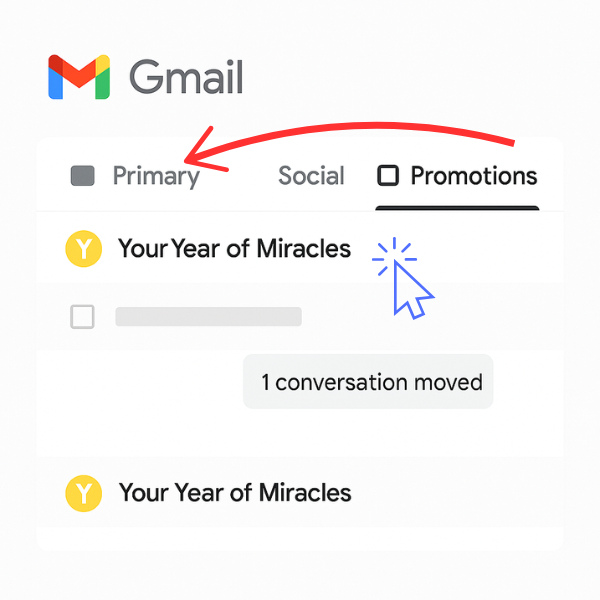

Then, when a prompt asks if you want future emails to go into your Primary inbox, just click yes.

Oh, and be sure to check your Promotions inbox to make sure nothing else you really want is getting caught in it.
Easy enough!
Optional Step Three:
If you want to totally turn off the tabbed inboxes (which I did, because I don't want anyone else screening the emails I’ve asked to receive, and I don't want to keep having to check multiple tabs), just click on the Settings “gear” image at the upper right corner of your inbox (seen in the first image) and select “See all Settings" (seen in the second image)


Click the “Inbox” tab and uncheck ALL of the categories except “Primary,” then save your changes.


